
In short
- Fieldfare is £49 a month for the whole team, while Jobber charges in US dollars by plan and by user.
- Fieldfare covers the staff side Jobber doesn't list: clocking in, holiday allowances, RAMS and COSHH, spray records and vans.
- Jobber is stronger on card payments and customer messaging. With Fieldfare, clients pay you directly and there are no per-payment fees.
Fieldfare and Jobber side by side
Jobber is made for home service businesses of every kind, and most of its features are about winning and billing customers. Fieldfare is made for UK gardening, landscaping and grounds maintenance teams with staff.
Prices and features come from each company's website in October 2026. Jobber's prices are in US dollars, before tax. For the wider field, see our roundup of the best gardening software.
- Price
- Fieldfare£49 a month for the whole business, up to 99 users
- JobberFrom $29 a month for one user (paid annually) to $699 a month for 15 users, plus $29 a month for each extra user
- Free trial
- Fieldfare30 days, card needed to start
- Jobber14 days, no card needed
- Clients with several sites
- FieldfareYes, each site with its own access notes and visit history
- JobberYes, as properties on the client
- Regular visits
- FieldfareYes, regular jobs fill the calendar and each visit can be moved on its own
- JobberYes, recurring jobs with visits
- Clocking in and timesheets
- FieldfareClock in and out on the phone, with timesheets and a payroll export
- JobberTime tracking (Connect and above)
- Holidays
- FieldfareAllowances, bookings and UK bank holidays by region
- JobberNot listed
- Health and safety
- FieldfareRAMS and COSHH library, site assessments, spray records and sign-offs
- JobberChecklists (Connect and above)
- Vans
- FieldfareMOT, tax, insurance and service dates
- JobberNot listed
- Quotes, invoices and payments
- FieldfareSimple PDF quotes and invoices, or keep using Xero, QuickBooks or Sage. No card payments
- JobberQuotes and invoices sent from the app with online approval, and card payments with card fees
- Client hub and texting
- FieldfareNo
- JobberClient hub, automatic reminders and follow-ups (Connect and above), two-way texting (Grow and above)
- Route planning
- FieldfareThe day's jobs on a map, with where everyone is heading
- JobberRoute optimisation
What an owner and five staff pay
On Jobber's Connect plan, five users are $199 a month on monthly billing, or $149 a month paid a year up front, and the sixth adds $29 a month, so $228 or $178. Grow, which adds automatic time tracking, job costing and two-way texting, starts at $299 a month for five users.
Fieldfare is £49 a month for the same six, and still £49 when three seasonal staff join in spring. Subcontractors get their own login too and only see the jobs assigned to them. Storage is 50 GB, then £5 a month for each extra 50 GB.
A sole trader paying annually will find Jobber's Core plan cheaper. Past that, each extra person on Jobber costs another $29 a month.
Staff tools Jobber doesn't list
With five staff, much of the weekly admin is about them: who clocked in at 7.30, who is off the week after next, which van is due its MOT and who hasn't signed the new COSHH assessment. Jobber lists no holiday or van tools. Fieldfare has:
- Clocking in and out on the phone, with odd times flagged and a payroll export.
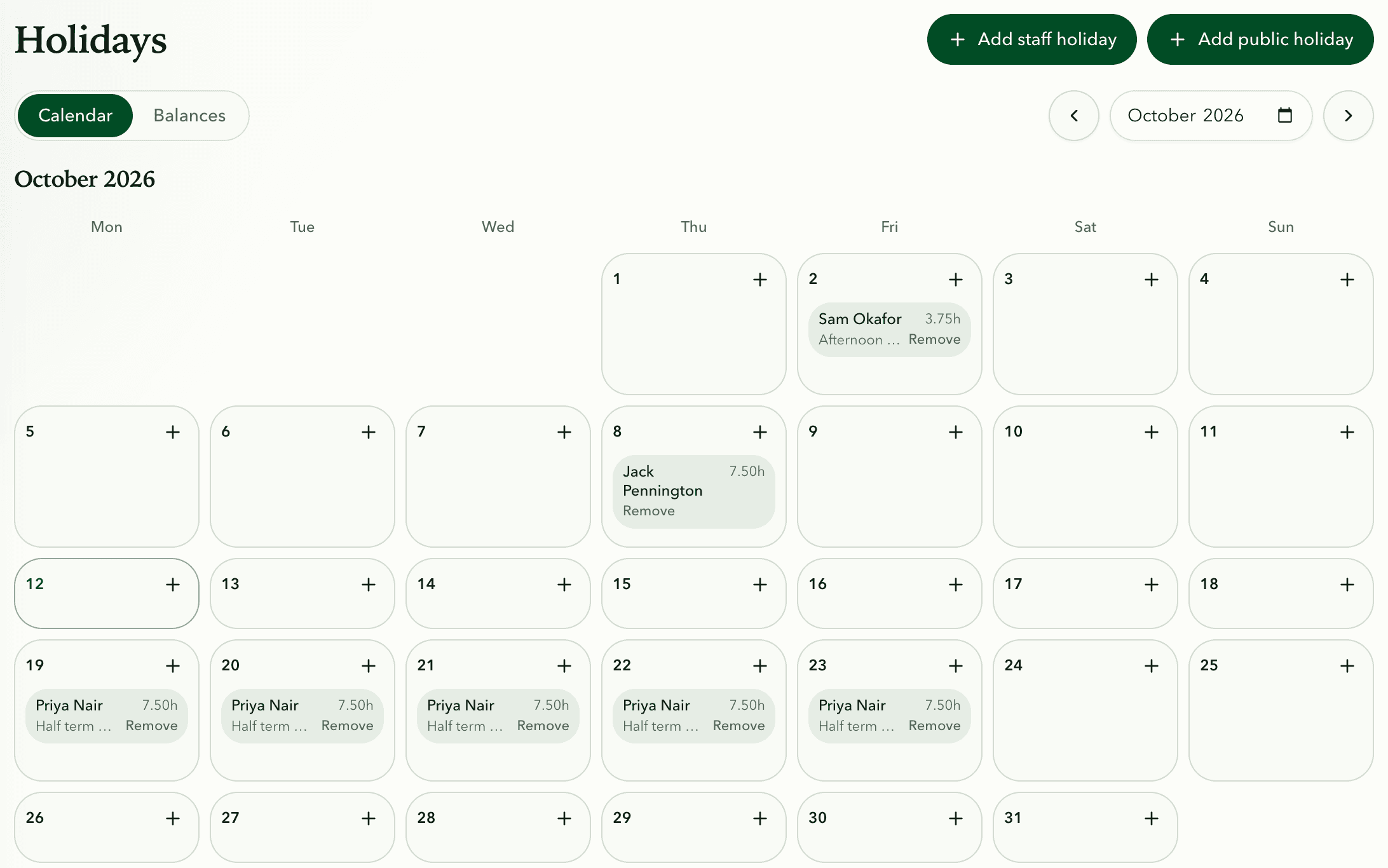
- Holiday allowances and bookings on one calendar, with bank holidays for England and Wales, Scotland or Northern Ireland.
- A RAMS and COSHH library with staff sign-offs, site assessments and spray records against each job.
- Van MOT, tax, insurance and service dates flagged before they lapse, and who drives each van.
- Contracts with values and renewal dates, linked to the regular jobs they cover.
Fieldfare
Try Fieldfare on your own round
Where Jobber is stronger
Jobber's customer tools are excellent: online quote approval, card payments, a client hub, automatic follow-ups, route optimisation and over 100 integrations. If most of your week goes on chasing quotes and payments, it does more of that for you.
Fieldfare doesn't take card payments. Clients pay into your bank or through Xero, QuickBooks or Sage, with no per-payment fees, and it reads those invoices and payments back so each client's history is complete. There's no route optimiser either. The map shows the day's jobs and where staff are heading, and you set the order knowing which client wants you there before nine.
Moving across from Jobber
Export your clients from Jobber as a spreadsheet and bring them in with the Excel or CSV import. Set up each regular visit once as a recurring job, add your staff and let them try the app on a few real visits.
Export your invoices and job history from Jobber before you cancel, for tax records. Winter is the easiest time to switch, while the round is quiet.
Fieldfare and Jobber questions
Is Fieldfare cheaper than Jobber?
For a team, yes. Six people on Jobber Connect cost $228 a month on monthly billing, against £49 on Fieldfare, and each extra user adds $29. For one person paying annually, Jobber's Core plan is cheaper.
Can Fieldfare take card payments from clients?
No. Clients pay you directly, with no per-payment fees, and if you use Xero, QuickBooks or Sage, Fieldfare reads the invoices and payments from there.
Does Jobber work in the UK?
Yes, UK businesses use it, although its website lists prices in US dollars.
Can I bring my clients across from Jobber?
Yes. Export your client list as a spreadsheet and use the client import, then set up your regular visits as recurring jobs.