
In short
- For a UK gardening business with staff, we'd pick Fieldfare: £49 a month covers up to 99 users, with clocking in and holiday allowances included.
- Jobber, Tradify and ServiceM8 are stronger on card payments and customer messaging, but charge per user or per job.
- Sole traders on a tight budget can start free with ServiceM8 or Yardbook.
The shortlist and what it costs
Fieldfare is ours, so weigh our pick with that in mind. Everything else comes from each company's own website and help centre in October 2026, except Yardbook, whose details come from published reviews. Prices are before VAT where the company says so.
- Fieldfare
- Price£49 a month for up to 99 users
- Best forUK gardening teams with staff, holidays, health and safety and vans to manage
- Jobber
- Price$29 to $699 a month in US dollars, by plan and users, plus $29 per extra user
- Best forBusinesses that want online payments, a client hub and marketing tools
- Tradify
- Price£34 to £44 per user a month
- Best forSmall teams that invoice from the field into Xero, QuickBooks or Sage
- ServiceM8
- PriceFree to £269 a month by number of jobs, with unlimited users
- Best forSmall rounds that want route optimisation, online booking and card payments
- Powered Now
- Price£28 a month for one user, then £32 to £40 per user a month
- Best forUK sole traders and small teams that want a UK-made all-rounder
- SortScape
- Price£10 to £630 a month by team size and plan, £39 to £79 for five staff
- Best forLawn and garden maintenance rounds that want route optimisation and spray records
- Yardbook
- PriceFree with adverts, paid plans $34.99 to $49.99 a month
- Best forSolo gardeners on a tight budget
Our pick for teams with staff
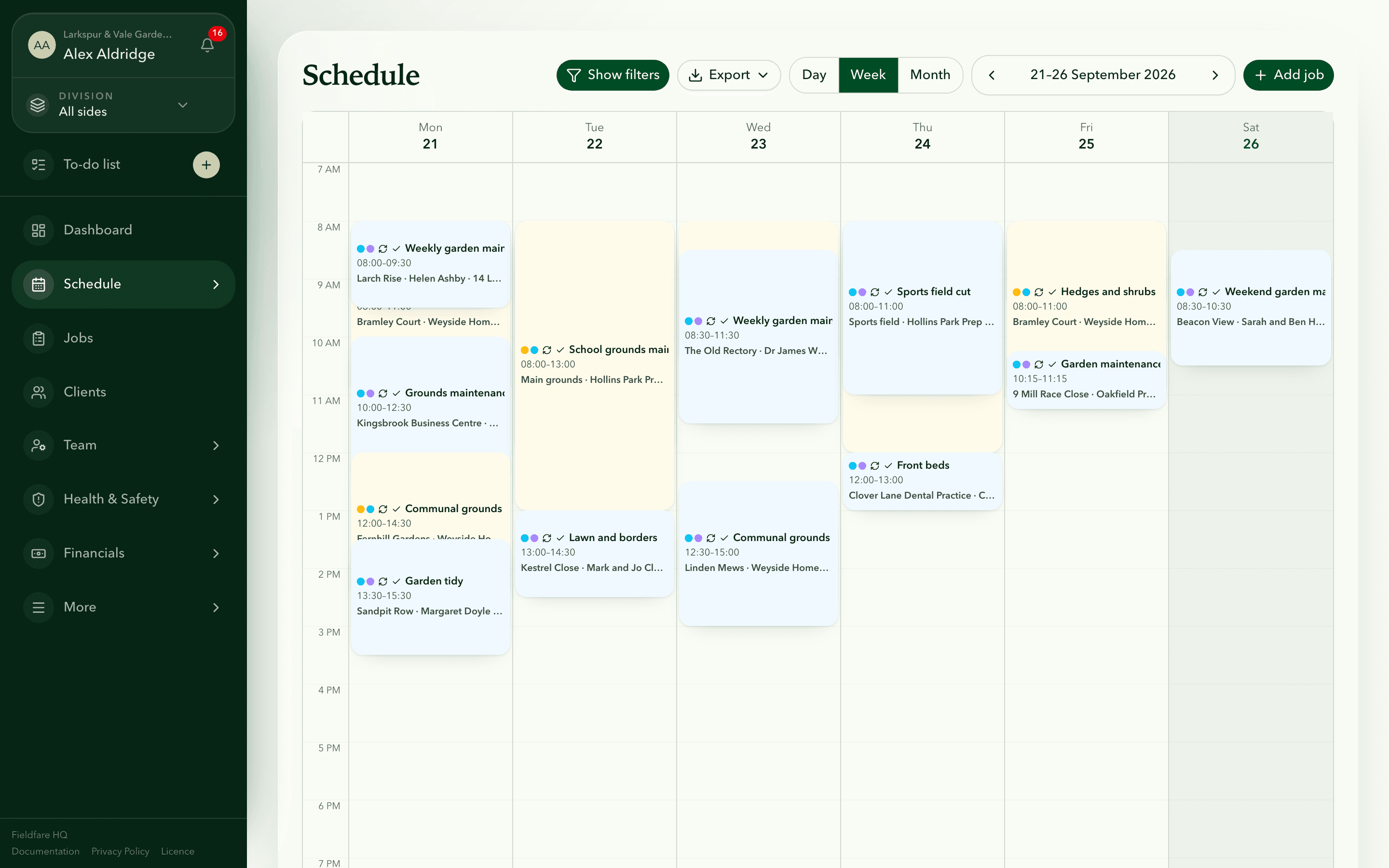
Most of these tools are built around winning and billing customers. With staff, much of the office work is about them: who clocked in at 7.40, who is off the week of the 14th, and whether the new starters have signed the COSHH assessment for the weedkiller on the van. Fieldfare covers that side for £49 a month, up to 99 users.
Clients can have several sites, each with its own access notes and visit history. Regular visits are set up once, so next Monday's work is already on the schedule, and staff see each site's gate code and parking notes on their phone.
- Clocking in and timesheets with a payroll export, and holiday allowances with UK bank holidays by region.
- A RAMS and COSHH library with sign-offs, spray records, van dates and contracts.
- No card payments or client texting. Clients pay you directly with no per-payment fees, and it reads invoices and payments from Xero, QuickBooks or Sage.
Fieldfare
Try Fieldfare with your own clients and staff
The other six, in brief
All six are decent products. Here is where each is strong, and what it lacks for a UK gardening team.
- Jobber (Canada): the best customer tools here, with online quote approval and payment, a client hub, follow-ups and route optimisation. Priced in US dollars by plan and user, with no holiday, UK health and safety or van tools listed. Full Jobber comparison.
- Tradify (owned by the UK's Access Group): strong on quotes, invoices and card payments, and the only one here that sends invoices to Sage. Charged per user, about £222 a month for six on Pro, with no clocking in and out. Full Tradify comparison.
- ServiceM8 (Australia): route optimisation, texting, online booking and saved-card payments on every plan, and a free plan for 30 jobs a month. Each recurring visit counts as a job, so about 130 visits a month needs the £59 plan. Full ServiceM8 comparison.
- Powered Now (UK): quotes, invoices, SumUp card payments, timesheets and an HR system for holidays, with Making Tax Digital built in. Per-user pricing, with route planning and timesheets on the Professional plan and forms aimed mainly at gas and electrical trades.
- SortScape (Australia): built only for lawn and garden maintenance, with several properties per client and route optimisation, from £10 a month. Reminders, accounting sync and spray records need Premium (£149 for 10 staff), and it has no staff document library or HR tools.
- Yardbook (US): free with adverts, covering scheduling, quotes, invoices and clocking in. No UK pricing or VAT handling, no Xero, and not on the UK App Store.
Which one fits your business
Price each one for your team at its busiest, seasonal staff included. Per-user and per-job tools look cheap in January and expensive in May. Our guide to choosing gardening software covers what to test during a trial.
- Team with staff, holidays and health and safety to manage: Fieldfare.
- Small round that wants booking, texting and card payments: ServiceM8 or Jobber.
- Small team invoicing into Sage: Tradify.
- Sole trader on a tight budget: the free plans from ServiceM8 or Yardbook, or SortScape Basic.
Questions about gardening software
What is the best software for a small gardening business with staff?
Fieldfare, for clocking in, holidays, RAMS and COSHH and vans at one flat price. If customer payments are your main headache, look at Jobber or ServiceM8.
Is there free gardening business software?
Yes. Yardbook has a free plan with adverts, and ServiceM8 has a free plan for one user and up to 30 jobs a month.
Which gardening software is made in the UK?
Fieldfare and Powered Now. Tradify started in New Zealand and is now owned by The Access Group, a UK company. Jobber is Canadian, ServiceM8 and SortScape are Australian, and Yardbook is American.
Which is cheapest for a team of five?
SortScape Basic at £39 a month, though reminders, accounting sync and spray records need Premium at £79. Fieldfare is £49 with everything included, while per-user tools such as Tradify and Powered Now cost around £160 to £185.